Creating Notes in Miden Assembly
Creating notes inside the MidenVM using Miden assembly
For toolchain requirements and shared fee helpers, see the Rust client setup.
Overview
In this tutorial, we will create a custom note that generates a copy of itself when it is consumed by an account. The purpose of this tutorial is to demonstrate how to create notes inside the MidenVM using Miden assembly (MASM). By the end of this tutorial, you will understand how to write MASM code that creates notes.
What We'll Cover
- Computing the note storage commitment and recipient in MASM
- Creating notes in MASM
Prerequisites
This tutorial assumes you have a basic understanding of Miden assembly and that you have completed the tutorial on creating a custom note.
Why Creating Notes in MASM Is Useful
Being able to create a note in MASM enables you to build various types of applications. Creating a note during the consumption of another note or from an account allows you to develop complex DeFi applications.
Here are some tangible examples of when creating a note in MASM is useful in a DeFi context:
- Creating notes that record selected values from an account's state
- Representing partially fillable buy/sell orders as notes (SWAPP)
- Handling withdrawals from a smart contract
What We Will Be Building
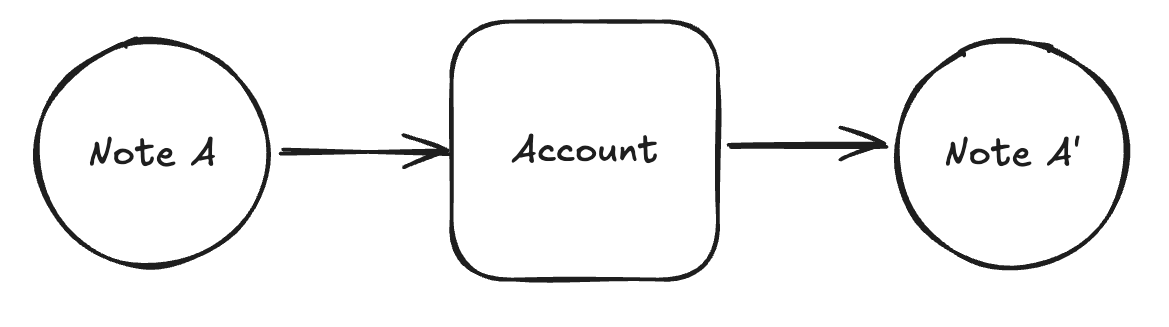
In the diagram above, note A is consumed by an account, and during the transaction, note A' is created.
In this tutorial, Alice creates a note containing 100 raw units of a fungible asset. Bob consumes it, keeps 50 units, and creates a successor note with the other 50, the same script and storage, and an incremented serial number. The script does not restrict consumption to a particular account.
This example requires exactly one fungible asset with a positive even amount and performs one split, from 100 to 50. MASM div is field division, so this script does not implement rounding for odd integer amounts and should not be used as an arbitrary repeated-halving contract.
Step 1: Initialize Your Repository
Start in the directory containing your tutorials clone and create a sibling Cargo project. The dependency path below assumes the clone is named tutorials.
cargo new miden-project
cd miden-project
rustup override set 1.98.1
cp ../tutorials/rust-client/Cargo.lock Cargo.lock
Keep the generated [package] section in Cargo.toml, replace its empty [dependencies] section with the following, and add the development profile:
[dependencies]
# Clone tutorials next to this Cargo project (see Rust client setup).
rust-client = { path = "../tutorials/rust-client" }
miden-client = { version = "=0.17.2", features = ["testing", "tonic"] }
miden-client-sqlite-store = { version = "=0.17.2", package = "miden-client-sqlite-store" }
miden-protocol = { version = "=0.17.1" }
rand = { version = "0.10" }
tokio = { version = "1.48", features = ["rt-multi-thread", "net", "macros", "fs"] }

[profile.dev]
opt-level = 2
Step 2: Write the Note Script
The note script is in masm/notes/iterative_output_note.masm. Note scripts are compiled as libraries; the @note_script attribute marks the entrypoint procedure.
use miden::protocol::active_note
use miden::protocol::note
use miden::core::sys
use miden::standards::wallets::basic as wallet
use miden::standards::note::note_creator

# CONSTANTS
# =================================================================================================

# get_initial_assets writes the eight-felt asset as ASSET_ID followed by ASSET_VALUE
const ASSET_ID_PTR = 0
const ASSET_VALUE_PTR = 4
const ASSET_HALF_VALUE_PTR = 8
const ACCOUNT_ID_PREFIX = 12      # storage: [prefix, suffix, tag, 0]
const TAG = 14                    # ACCOUNT_ID_PREFIX + 2

# PUBLIC INTERFACE
# =================================================================================================

#! Receives this note's assets and creates a successor with half its fungible amount.
#!
#! This example expects exactly one fungible asset with a positive, even amount. Field division
#! by two is not integer rounding, so an odd amount does not produce a valid half-amount transfer.
#! Any account exposing the wallet and note-creator procedures may consume the note; the account
#! ID in storage is copied into the successor's storage and does not restrict consumption.
#!
#! Inputs:  [ARGS, pad(12)]
#! Outputs: [pad(16)]
#!
#! Where:
#! - ARGS contains unused note arguments.
#! - note storage contains a copied account ID and the successor's note tag.
#!
#! Panics if:
#! - the account cannot receive the note's assets or move the computed half amount to the successor.
#!
#! Invocation: dyncall
@note_script
pub proc main(args: word)
    # discard the unused note arguments
    dropw
    # => [pad(16)]

    # get asset contained in note into memory (ASSET_ID at 0, ASSET_VALUE at 4)
    # get_initial_assets leaves [num_assets] on the stack; drop it.
    push.ASSET_ID_PTR exec.active_note::get_initial_assets drop
    # => [pad(16)]

    # load ASSET_VALUE and compute half amount
    padw push.ASSET_VALUE_PTR mem_loadw_le
    # => [[amount, 0, 0, 0], pad(16)]

    # halve the even fungible amount
    push.2 div
    # => [[amount / 2, 0, 0, 0], pad(16)]

    # store as ASSET_HALF_VALUE
    mem_storew_le.ASSET_HALF_VALUE_PTR dropw
    # => [pad(16)]

    # receive all assets from note into the account wallet
    exec.wallet::move_note_assets_to_account
    # => [pad(16)]

    # push script hash
    exec.active_note::get_script_root
    # => [SCRIPT_ROOT, pad(16)]

    # get the current note serial number
    exec.active_note::get_serial_number
    # => [SERIAL_NUM, SCRIPT_ROOT, pad(16)]

    # increment the last element of the serial number by 1
    # (serial_num[3] is at depth 3; matches Rust: serial_num[3] + 1)
    swap.3 push.1 add swap.3
    # => [NEXT_SERIAL_NUM, SCRIPT_ROOT, pad(16)]

    # load note storage into memory for recipient construction
    push.ACCOUNT_ID_PREFIX
    exec.active_note::get_storage
    # => [num_storage_items, NEXT_SERIAL_NUM, SCRIPT_ROOT, pad(16)]

    push.ACCOUNT_ID_PREFIX
    # => [storage_ptr, num_storage_items, NEXT_SERIAL_NUM, SCRIPT_ROOT, pad(16)]

    # argument shape: [storage_ptr, num_storage_items, SERIAL_NUM, SCRIPT_ROOT].
    exec.note::compute_and_store_recipient
    # => [RECIPIENT, pad(16)]

    # push note type to stack (public note = 1)
    push.1
    # => [note_type, RECIPIENT, pad(16)]

    # load tag from memory
    mem_load.TAG
    # => [tag, note_type, RECIPIENT, pad(16)]

    # note creation from a note script must call the account's note-creator procedure.
    # pad the stack for the account procedure call convention.
    push.0 movdn.6 push.0 movdn.6 padw padw swapdw
    # => [tag, note_type, RECIPIENT, pad(26)]

    call.note_creator::create_note
    # => [note_idx, pad(31)]

    movdn.15 dropw dropw dropw drop drop drop
    # => [note_idx, pad(16)]

    # build [ASSET_ID, ASSET_HALF_VALUE, note_idx] for move_asset_to_note
    # inputs: [ASSET_ID, ASSET_VALUE, note_idx, pad(7)]

    # push ASSET_HALF_VALUE (note_idx moves to depth 4)
    padw push.ASSET_HALF_VALUE_PTR mem_loadw_le
    # => [ASSET_HALF_VALUE, note_idx, pad(16)]

    # push ASSET_ID (ASSET_HALF_VALUE moves to depth 4, note_idx to depth 8)
    padw push.ASSET_ID_PTR mem_loadw_le
    # => [ASSET_ID, ASSET_HALF_VALUE, note_idx, pad(16)]

    call.wallet::move_asset_to_note
    # => [pad(25)]

    dropw dropw dropw dropw
    # => [pad(16)]

    exec.sys::truncate_stack
    # => [pad(16)]
end
How the Assembly Code Works:
- Retrieving the asset:
The note callsactive_note::get_initial_assetsto copy the initial asset into memory, withASSET_IDat address 0 andASSET_VALUEat address 4. It halves the amount inASSET_VALUEand stores it atASSET_HALF_VALUE_PTR. Finally, it callswallet::move_note_assets_to_account, which explicitly removes the assets from the note and receives them into the consuming account. - Getting the script hash and serial number:
The note script callsactive_note::get_script_rootto fetch the script hash andactive_note::get_serial_numberto fetch the current serial number, then increments element 3 (the last element) by 1 to avoid duplicate recipients. - Building the
RECIPIENT:
The script loads the note storage into memory withactive_note::get_storage, then callsnote::compute_and_store_recipient. This computes the storage commitment and stores the preimage in the advice map, which is required for public notes. - Creating the note:
To create the note from a note script, the script pads the stack for the account-call ABI and calls the account's exportednote_creator::create_noteprocedure, which enters the account context and returns the note index. The consuming account must exposeNoteCreator;BasicWalletincludes it. - Moving assets to the note:
After the note is created, the script loadsASSET_IDandASSET_HALF_VALUEfrom memory onto the stack and callswallet::move_asset_to_notewith the note index. - Stack cleanup:
Finally, the script cleans up the stack by callingsys::truncate_stack.
Step 3: Rust Program
With the Miden assembly note script written, we can move on to writing the Rust script to create and consume the note.
Copy and paste the following code into your src/main.rs file.
use rand::Rng;
use rust_client::TutorialClientExt;
use std::{path::PathBuf, sync::Arc};
use tokio::time::{Duration, sleep};

use miden_client::{
    Client, ClientError, Felt,
    account::{
        Account, AccountBuilder, AccountType,
        component::{
            create_singlesig_user_fungible_faucet, BasicWallet, BurnPolicy, FungibleFaucet,
            MintPolicy, TokenName, TokenPolicyManager,
        },
    },
    address::NetworkId,
    asset::{AssetAmount, AssetId, FungibleAsset, TokenSymbol},
    auth::{AuthSecretKey, AuthSingleSig},
    builder::ClientBuilder,
    rng::draw_word,
    keystore::{FilesystemKeyStore, Keystore},
    note::{
        Note, NoteAssets, NoteDetails, NoteRecipient, NoteStorage, NoteTag, NoteType,
        PartialNoteMetadata,
    },
    rpc::{GrpcClient, VerifyingRpcClient},
    transaction::{TransactionId, TransactionRequestBuilder},
};
use miden_client_sqlite_store::ClientBuilderSqliteExt;
use rust_client::{FeeConfig, TutorialNetwork, fund_account_for_fees};

// Helper to create a basic account
async fn create_basic_account(
    client: &mut Client<FilesystemKeyStore>,
    keystore: &Arc<FilesystemKeyStore>,
) -> Result<Account, ClientError> {
    let mut init_seed = [0u8; 32];
    client.rng().fill_bytes(&mut init_seed);

    let key_pair = AuthSecretKey::new_falcon512_poseidon2_with_rng(client.rng());

    let account = AccountBuilder::new(init_seed)
        .account_type(AccountType::Public)
        .with_component(AuthSingleSig::from_public_key(key_pair.public_key()))
        .with_component(BasicWallet)
        .build()
        .unwrap();

    client.add_account(&account, false).await?;
    keystore.add_key(&key_pair, account.id()).await.unwrap();

    Ok(account)
}

async fn create_basic_faucet(
    client: &mut Client<FilesystemKeyStore>,
    keystore: &Arc<FilesystemKeyStore>,
) -> Result<Account, ClientError> {
    let mut init_seed = [0u8; 32];
    client.rng().fill_bytes(&mut init_seed);

    let key_pair = AuthSecretKey::new_falcon512_poseidon2_with_rng(client.rng());
    let symbol = TokenSymbol::new("MID").unwrap();
    let decimals = 8;
    let max_supply = AssetAmount::new(1_000_000).unwrap();

    let faucet = FungibleFaucet::builder()
        .name(TokenName::new("MID").unwrap())
        .symbol(symbol)
        .decimals(decimals)
        .max_supply(max_supply)
        .build()
        .unwrap();
    let policies = TokenPolicyManager::builder()
        .active_mint_policy(MintPolicy::allow_all())
        .active_burn_policy(BurnPolicy::allow_all())
        .build();
    let account = create_singlesig_user_fungible_faucet(
        init_seed,
        faucet,
        AuthSingleSig::from_public_key(key_pair.public_key()),
        policies,
        AccountType::Public,
    )
    .unwrap();

    client.add_account(&account, false).await?;
    keystore.add_key(&key_pair, account.id()).await.unwrap();

    Ok(account)
}

// Helper to wait until an account has the expected number of consumable notes
async fn wait_for_notes(
    client: &mut Client<FilesystemKeyStore>,
    account_id: &Account,
    expected: usize,
    network_id: NetworkId,
) -> Result<(), ClientError> {
    for _ in 0..24 {
        client.sync_state().await?;
        let notes = client
            .get_consumable_tutorial_notes(Some(account_id.id()))
            .await?;
        if notes.len() >= expected {
            return Ok(());
        }
        println!(
            "{} consumable notes found for account {}. Waiting...",
            notes.len(),
            account_id.id().to_bech32(network_id.clone())
        );
        sleep(Duration::from_secs(3)).await;
    }
    Err(ClientError::Observer(Box::new(std::io::Error::other(
        format!(
            "timed out waiting for {expected} tutorial notes for {}",
            account_id.id()
        ),
    ))))
}

/// Waits for a specific transaction to be committed.
async fn wait_for_tx(
    client: &mut Client<FilesystemKeyStore>,
    tx_id: TransactionId,
) -> Result<(), ClientError> {
    rust_client::wait_for_transaction(client, tx_id).await
}

#[tokio::main]
async fn main() -> Result<(), ClientError> {
    // Initialize client
    let network = TutorialNetwork::from_env()?;
    let endpoint = network.endpoint();
    let timeout_ms = 10_000;
    let rpc_client = Arc::new(VerifyingRpcClient::new(GrpcClient::new(
        &endpoint, timeout_ms,
    )));

    // Initialize keystore
    let keystore_path = PathBuf::from("./keystore");
    let keystore = Arc::new(FilesystemKeyStore::new(keystore_path).unwrap());

    let store_path = PathBuf::from("./store.sqlite3");

    let mut client = ClientBuilder::new()
        .rpc(rpc_client)
        .sqlite_store(store_path)
        .authenticator(keystore.clone())
        .build()
        .await?;

    let sync_summary = client.sync_state().await.unwrap();
    println!("Latest block: {}", sync_summary.block_num);
    let fee_config = FeeConfig::from_client(&client, network).await?;

    // -------------------------------------------------------------------------
    // STEP 1: Create accounts and deploy faucet
    // -------------------------------------------------------------------------
    println!("\n[STEP 1] Creating new accounts");
    let alice_account = create_basic_account(&mut client, &keystore).await?;
    println!(
        "Alice's account ID: {:?}",
        alice_account.id().to_bech32(network.network_id())
    );
    let bob_account = create_basic_account(&mut client, &keystore).await?;
    println!(
        "Bob's account ID: {:?}",
        bob_account.id().to_bech32(network.network_id())
    );

    println!("\nDeploying a new fungible faucet.");
    let faucet = create_basic_faucet(&mut client, &keystore).await?;
    println!(
        "Faucet account ID: {:?}",
        faucet.id().to_bech32(network.network_id())
    );
    for account_id in [alice_account.id(), bob_account.id(), faucet.id()] {
        fund_account_for_fees(&mut client, account_id, &fee_config).await?;
    }
    client.sync_state().await?;

    // -------------------------------------------------------------------------
    // STEP 2: Mint tokens with P2ID
    // -------------------------------------------------------------------------
    println!("\n[STEP 2] Mint tokens with P2ID");
    let faucet_id = faucet.id();
    let amount: u64 = 100;
    let mint_amount = FungibleAsset::new(faucet_id, amount).unwrap();

    let tx_req = TransactionRequestBuilder::new()
        .build_mint_fungible_asset(
            mint_amount,
            alice_account.id(),
            NoteType::Public,
            client.rng(),
        )
        .unwrap();

    let tx_id = client
        .submit_tutorial_transaction(faucet.id(), tx_req)
        .await?;
    println!("Minted tokens. TX: {:?}", tx_id);

    wait_for_notes(&mut client, &alice_account, 1, network.network_id()).await?;

    // Consume the minted note
    let consumable_notes = client
        .get_consumable_tutorial_notes(Some(alice_account.id()))
        .await?;

    if let Some((note_record, _)) = consumable_notes.first() {
        let note: Note = note_record.clone().try_into()?;
        let consume_req = TransactionRequestBuilder::new().build_consume_notes(vec![note])?;

        let tx_id = client
            .submit_tutorial_transaction(alice_account.id(), consume_req)
            .await?;
        println!("Consumed minted note. TX: {:?}", tx_id);
    }

    client.sync_state().await?;

    // -------------------------------------------------------------------------
    // STEP 3: Create iterative output note
    // -------------------------------------------------------------------------
    println!("\n[STEP 3] Create iterative output note");

    // Read the MASM source from the tutorials repository.
    let code =
        std::fs::read_to_string("../tutorials/masm/notes/iterative_output_note.masm").unwrap();
    let serial_num = draw_word(client.rng());

    // Create note metadata and tag
    let tag = NoteTag::new(0);
    let metadata = PartialNoteMetadata::new(alice_account.id(), NoteType::Public).with_tag(tag);
    let note_script = client.code_builder().compile_note_script(&code).unwrap();
    let note_storage = NoteStorage::new(vec![
        alice_account.id().prefix().as_felt(),
        alice_account.id().suffix(),
        tag.into(),
        Felt::new_unchecked(0),
    ])
    .unwrap();

    let recipient = NoteRecipient::new(serial_num, note_script.clone(), note_storage.clone());
    let vault = NoteAssets::new(vec![mint_amount.into()])?;
    let custom_note = Note::new(vault, metadata, recipient);

    let note_req = TransactionRequestBuilder::new()
        .own_output_notes(vec![custom_note.clone()])
        .build()
        .unwrap();

    let tx_id = client
        .submit_tutorial_transaction(alice_account.id(), note_req)
        .await?;
    println!(
        "View transaction on MidenScan: {}/tx/{:?}",
        network.explorer_url(),
        tx_id
    );

    client.sync_state().await?;

    // -------------------------------------------------------------------------
    // STEP 4: Consume the iterative output note
    // -------------------------------------------------------------------------
    println!("\n[STEP 4] Bob consumes the note and creates a copy");

    // Increment the serial number for the new note
    let serial_num_1 = [
        serial_num[0],
        serial_num[1],
        serial_num[2],
        serial_num[3] + Felt::new_unchecked(1),
    ]
    .into();

    // Reuse the note_script and note_storage
    let recipient = NoteRecipient::new(serial_num_1, note_script, note_storage);

    // Note: Change metadata to include Bob's account as the creator
    let metadata = PartialNoteMetadata::new(bob_account.id(), NoteType::Public).with_tag(tag);

    let asset_amount_1 = FungibleAsset::new(faucet_id, 50).unwrap();
    let vault = NoteAssets::new(vec![asset_amount_1.into()])?;
    let output_note = Note::new(vault, metadata, recipient);

    let consume_custom_req = TransactionRequestBuilder::new()
        .input_notes([(custom_note, None)])
        .expected_future_notes(vec![
            (
                NoteDetails::from(output_note.clone()),
                output_note.metadata().tag(),
            )
                .clone(),
        ])
        .expected_output_recipients(vec![output_note.recipient().clone()])
        .build()
        .unwrap();

    let tx_id = client
        .submit_tutorial_transaction(bob_account.id(), consume_custom_req)
        .await?;
    println!(
        "Consumed Note Tx on MidenScan: {}/tx/{:?}",
        network.explorer_url(),
        tx_id
    );

    wait_for_tx(&mut client, tx_id).await?;

    // The SDK verifies expected recipients; also check the actual successor's assets and metadata.
    let successor = client
        .get_output_note(output_note.id())
        .await?
        .expect("the transaction must create the expected successor note");
    assert!(successor.is_committed(), "the successor must be committed");
    assert_eq!(successor.assets(), output_note.assets());
    assert_eq!(successor.metadata(), output_note.metadata());
    println!(
        "Successor note committed with 50 tokens: {}",
        successor.id()
    );

    let bob = client
        .get_account(bob_account.id())
        .await?
        .expect("Bob's account must exist after consuming the note");
    let balance = bob.vault().get_balance(AssetId::new_fungible(faucet_id))?;
    assert_eq!(
        balance.as_u64(),
        50,
        "Bob must retain the other half of the note's tokens",
    );
    println!("Bob's retained token balance: {balance}");

    Ok(())
}
Run the following command to execute src/main.rs:
TUTORIAL_NETWORK=testnet cargo run --release
The following is an abbreviated output; IDs vary, and funding and repeated confirmation messages are omitted:
Latest block: <current_block_number>

[STEP 1] Creating new accounts
Alice's account ID: "<testnet_account_id>"
Bob's account ID: "<testnet_account_id>"

Deploying a new fungible faucet.
Faucet account ID: "<testnet_account_id>"

[STEP 2] Mint tokens with P2ID
Minted tokens. TX: <transaction_id>
Consumed minted note. TX: <transaction_id>

[STEP 3] Create iterative output note
View transaction on MidenScan: https://testnet.midenscan.com/tx/<transaction_id>

[STEP 4] Bob consumes the note and creates a copy
Consumed Note Tx on MidenScan: https://testnet.midenscan.com/tx/<transaction_id>
Transaction committed: <transaction_id>
Successor note committed with 50 tokens: <successor_note_id>
Bob's retained token balance: 50
Running the example
From the root of your tutorials clone, run the checked-in example:
cd rust-client
TUTORIAL_NETWORK=testnet cargo run --release --bin note_creation_in_masm
Continue learning
Next tutorial: Delegated Proving